Web design agencies
Client sign-off without the screenshot ping-pong. Each client sees only their own pins, and your internal notes stay private.
LayerDock for agenciesA product I co-founded and engineer
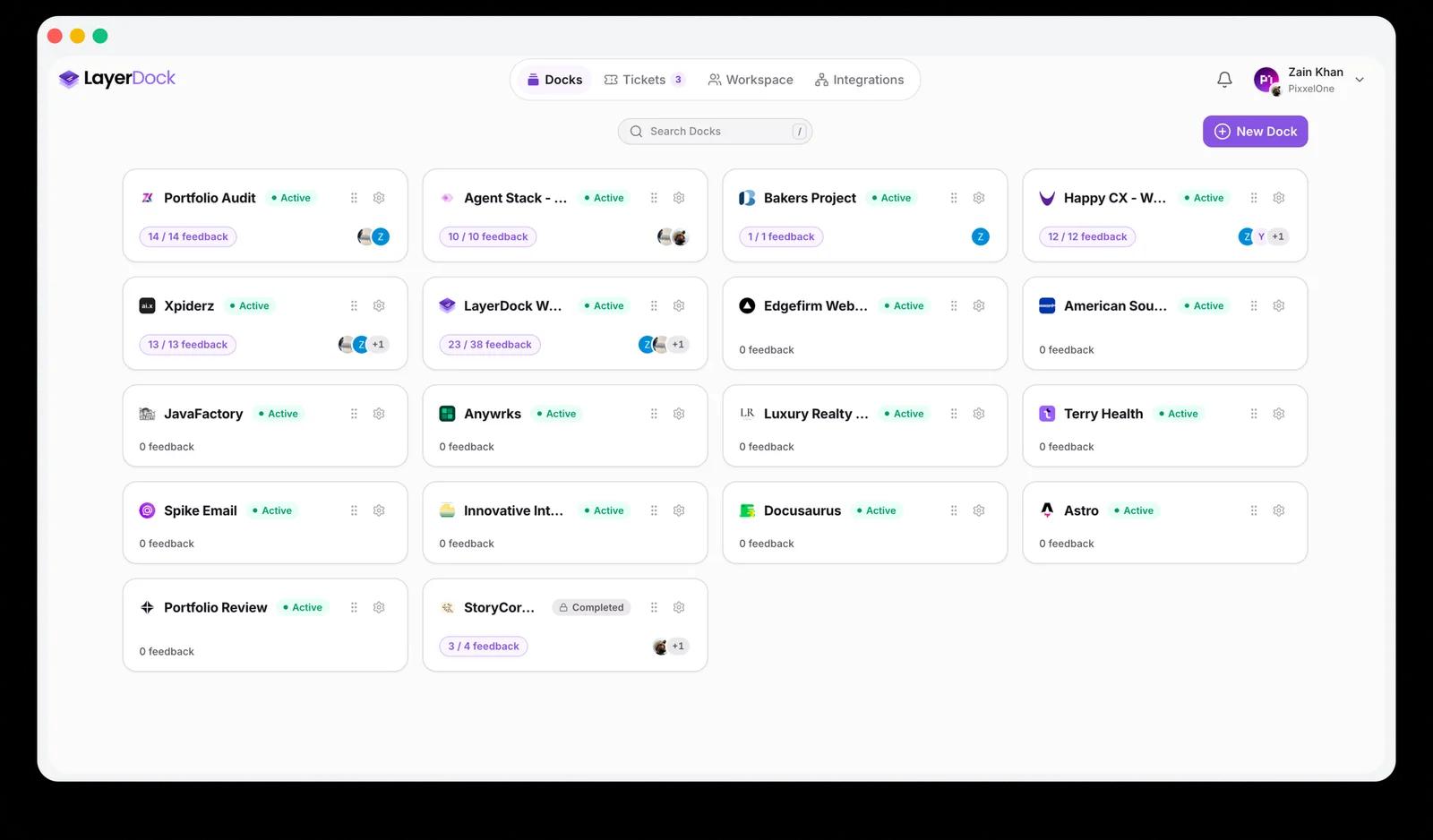
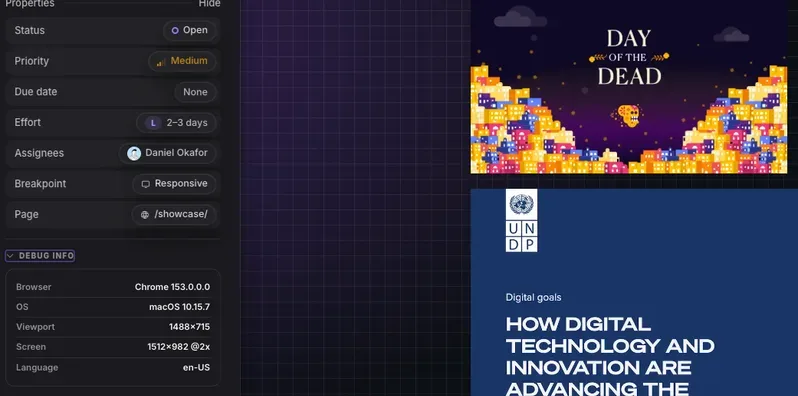
LayerDock is a visual website feedback tool. Your client opens a link, clicks the thing on the page that is wrong, and types what they want. Each comment is pinned to that element and arrives with a screenshot, the CSS selector, the viewport, console logs and network requests, so a developer, or a coding agent like Claude Code or Cursor, can fix it without asking a single follow-up question.
Website feedback usually arrives as a screenshot in an email, a voice note, or a line in a spreadsheet that says “the button on the pricing page looks off.” Which button? On which screen size? Was there an error in the console? A developer spends the first round of replies just working out what the client meant.
LayerDock moves the conversation onto the page itself. The comment is pinned to the exact element, and everything a developer would have asked for is captured at the moment the client clicks. The first reply can be the fix.
A dock is one website. Paste its URL and LayerDock gives you a review link. Nothing to install on the site, and nothing for reviewers to install either.
Clients and teammates open the link in any browser. They review the real, live site, switch between desktop, tablet and mobile, and never create an account.
Reviewers click any element and type. You triage the pins in the dashboard, assign them, or hand them straight to your coding agent to fix.
Pins move through Open, In review, Changes requested, Approved and Resolved. New to the vocabulary? Read what a dock is.
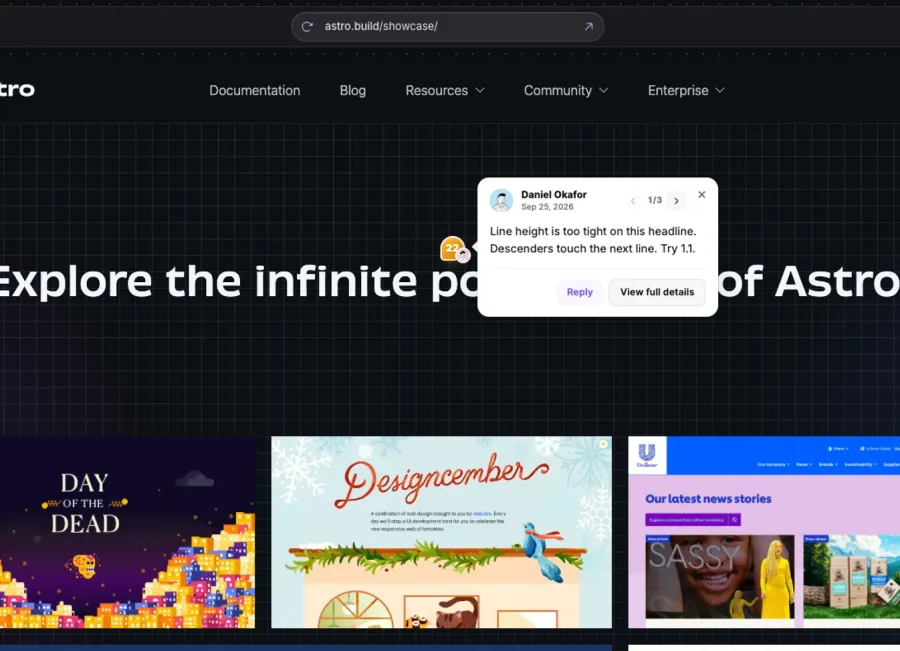
This is the part that makes LayerDock a visual bug reporting tool and not just a comment box. Nobody fills these in. They are recorded automatically.
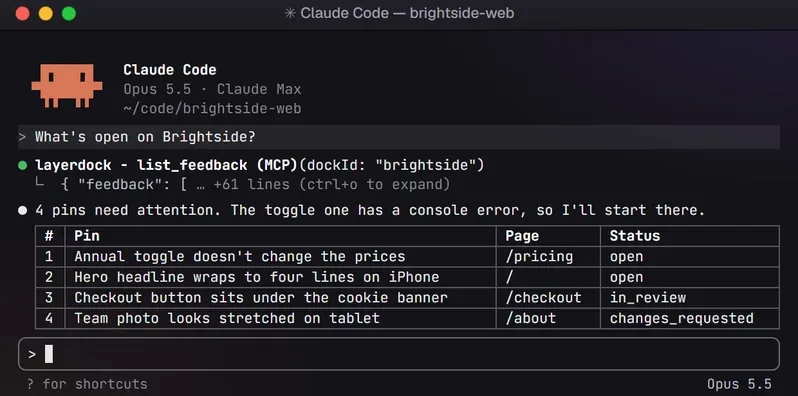
LayerDock ships an MCP server, @layerdock/mcp. Connect it once and Claude Code, Cursor, Codex or any other MCP client can list a dock’s open pins, read the selector, screenshot and console trace, fix the bug in your codebase, reply on the thread and mark the pin resolved. Client feedback becomes a to-do list your agent can work through.
.mcp.json in your project
{
  "mcpServers": {
    "layerdock": {
      "command": "npx",
      "args": ["-y", "@layerdock/mcp"],
      "env": { "LAYERDOCK_TOKEN": "ldk_..." }
    }
  }
}
Setup for Claude Code, Cursor, Codex CLI, Windsurf, VS Code and Zed: connect your coding agent.
Client sign-off without the screenshot ping-pong. Each client sees only their own pins, and your internal notes stay private.
LayerDock for agenciesBug reports that are reproducible on the first read, with the console and network trace already attached.
Website QA testingClaude Code or Cursor reads the open pins over MCP, fixes them in your codebase, replies on the thread and marks them resolved.
AI bug fixingThe free plan covers two client sites, with no time limit. Send one link and stop chasing feedback across email, WhatsApp and Slack.
Try it on your siteThere is a free plan with no time limit, so you can run real client reviews before paying anything. Paid plans start with a 14-day free trial.
$0 forever
$19 a month, or $15 billed yearly
$69 a month, or $59 billed yearly
Prices checked October 2026. The current numbers always live on LayerDock’s pricing page.
Most website feedback tools will collect a comment and a screenshot. LayerDock’s difference is what comes with it: the selector, console and network trace on every pin, nothing for the reviewer to install, and a direct line to your coding agent. The LayerDock team keeps side-by-side comparisons with the tools people usually weigh it against:
Or read the full roundup of the best website feedback tools.
I lead LayerDock’s engineering end to end. The hard part was never the comment box. It was making a client’s live website reviewable without asking anyone to install anything, and making each pin precise enough that a developer, or an AI agent, can act on it without a follow-up question.
A Cloudflare Worker serves the client’s real site with the pin tool injected, which is why nobody has to install a script or an extension to leave feedback.
Runs inside the reviewed page, resolves a stable CSS selector for the clicked element, and records the screenshot, console and network trace at that moment.
Next.js 16 on Vercel: the dashboard, the guest review portal and 110+ API routes, on Supabase Postgres with row-level security.
Published to npm as @layerdock/mcp. It gives Claude Code, Cursor, Codex and other MCP clients the pins with their full context, and lets them reply and resolve.
Paddle subscriptions with a free plan and 14-day trials, plus handoff to Slack, Jira, Linear, GitHub and Trello.
An optional Manifest V3 launcher for Pro and Agency that adds a dock from whatever site you are on.
LayerDock is a visual website feedback tool. Your client opens a link, clicks the thing on the page that is wrong, and types what they want. Each comment is pinned to that element and arrives with a screenshot, the CSS selector, the viewport, console logs and network requests, so a developer, or a coding agent like Claude Code or Cursor, can fix it without asking a single follow-up question.
LayerDock was co-founded by Muhammad Adeen Khan (Adeen Khan), an AI engineer from Karachi, Pakistan, who leads its engineering: the review proxy, the pin tool, the Next.js web app, the database, billing, the integrations and the MCP server.
Yes. The Free plan is $0 forever with 2 docks, 35 feedback submissions a month and a client share link on one dock, and it needs no credit card. Pro is $19 a month ($15 billed yearly) and Agency is $69 a month ($59 billed yearly). Paid plans start with a 14-day free trial.
No. Clients open a share link in any browser and start pinning comments on the live site. They never sign up, and they never install anything.
Through its MCP server, @layerdock/mcp. Once connected with an API token, Claude Code, Cursor and other MCP clients can list a dock’s open pins, read each pin’s selector, screenshot and console trace, fix the issue in your codebase, reply on the thread and mark the pin resolved.
LayerDock attaches developer context (screenshot, CSS selector, viewport, console logs and network requests) to every pin automatically, works without anything installed by the reviewer, and hands feedback straight to coding agents over MCP. LayerDock publishes detailed side-by-side comparisons with BugHerd, Marker.io, MarkUp.io, Userback, Jam.dev and others on layerdock.io.
Paste any URL and get a working review link. No account, no install, no card.